
TRANSEND migration tool | Review | Medha Cloud

The TRANSEND migration tool is a powerful solution for businesses looking to transfer their data seamlessly from one platform to another. With its user-friendly interface and robust features, it simplifies the often complex migration process. In this review, we will explore the key aspects of TRANSEND, including its setup, data migration capabilities, security features, and customer support, helping you determine if it’s the right choice for your organization.
Key Takeaways
- TRANSEND offers a simple and effective way to migrate data across various platforms.
- It supports a wide range of email systems and data types, making it versatile for different needs.
- The tool ensures data security with features like encryption and access controls.
- Users can customize migration settings to fit their specific requirements easily.
- Excellent customer support and resources are available to assist users throughout the migration process.
Overview of TRANSEND migration tool
TRANSEND is a powerful migration tool designed to help users move their data seamlessly between different platforms. It simplifies the complex process of data migration, making it accessible for everyone, regardless of technical skill.
Key features
- Flexible Migration Options: Users can migrate specific folders or entire accounts based on their needs.
- Real-Time Monitoring: Track the status of your migration in real-time, ensuring everything is on track.
- Batch Processing: Migrate multiple accounts at once, saving time and effort.
Supported platforms
| Platform | Supported Versions |
|---|---|
| Microsoft 365 | All versions |
| Google Workspace | All versions |
| Various Email Clients | Legacy and current |
User interface
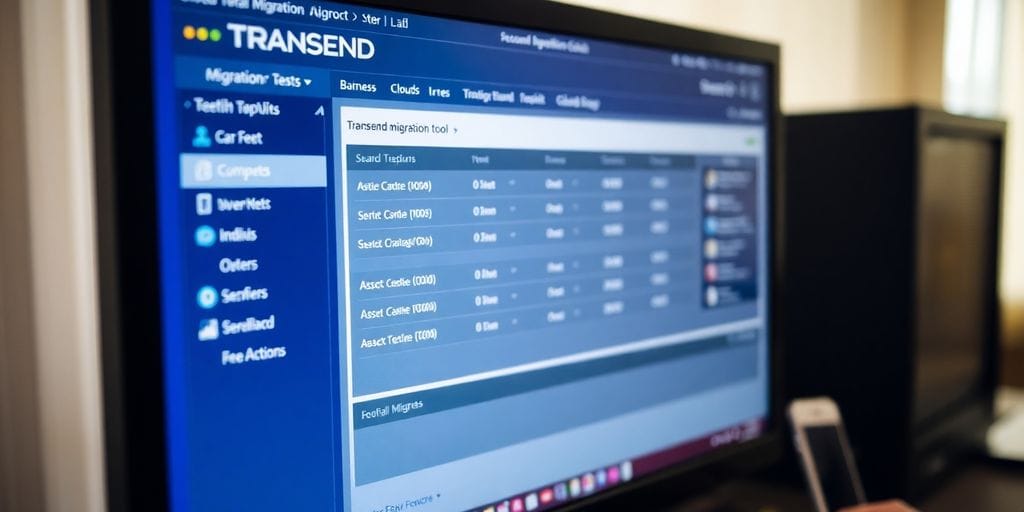
The user interface of TRANSEND is designed to be intuitive and user-friendly. Users can easily navigate through the options, making the migration process straightforward.
TRANSEND is not just a tool; it’s a solution that adapts to your unique migration needs, ensuring a smooth transition without data loss.
With its robust features and ease of use, TRANSEND stands out as a reliable choice for businesses looking to migrate their data efficiently. Whether you are moving emails, calendars, or contacts, TRANSEND has you covered.
Setting up the TRANSEND migration tool

System requirements
To successfully install the TRANSEND migration tool, ensure your system meets the following requirements:
- Operating System: Windows 10 or later, or macOS 10.12 or later.
- RAM: Minimum of 4 GB (8 GB recommended).
- Disk Space: At least 500 MB of free space.
- Network: Stable internet connection for activation and updates.
Installation process
The installation of the TRANSEND migration tool is straightforward. Follow these steps:
- Download the installation file from the official website.
- Run the installer and follow the on-screen instructions.
- Enter your license key when prompted.
- Complete the installation and restart your computer if necessary.
Tip: Always check for the latest version to ensure you have the most recent features and security updates.
Initial configuration
After installation, configure the tool to suit your needs:
- User Accounts: Set up user accounts for those who will be using the tool.
- Source and Target Settings: Specify the source and target platforms for migration.
- Migration Preferences: Customize settings such as data types to migrate and scheduling options.
By following these steps, you can ensure a smooth setup process for the TRANSEND migration tool, making your data migration experience efficient and effective. Remember, proper configuration is key to a successful migration!
Migrating data with TRANSEND
Supported data types
Transend migration tool supports a wide range of data types, making it versatile for various needs. Here are some of the key data types you can migrate:
- Emails
- Address books
- Calendars
- Tasks
- Archives
This flexibility allows businesses to tailor their migration process to their specific requirements.
Step-by-step migration guide
To ensure a smooth migration process, follow these steps:
- Prepare your data: Identify what data needs to be migrated and set any necessary filters.
- Install the TRANSEND tool: Ensure you meet the system requirements and follow the installation instructions.
- Configure settings: Set up your migration preferences, including user mappings and data types.
- Start migration: Initiate the migration process and monitor the progress in real-time.
- Validate data: After migration, check that all data has been transferred correctly.
Common issues and solutions
While using TRANSEND, you may encounter some common issues. Here are solutions to help you:
- Slow migration speed: Ensure your internet connection is stable and consider scheduling migrations during off-peak hours.
- Data integrity concerns: Use the built-in verification tools to check for any discrepancies post-migration.
- Compatibility issues: Make sure that the source and target systems are supported by TRANSEND.
Remember, proper planning and execution can lead to an effortless Microsoft 365 tenant-to-tenant migration.
Security features of TRANSEND
Data encryption
Transend migration tool prioritizes data security by implementing advanced encryption methods. This ensures that sensitive information remains protected during the migration process. The tool uses encrypted virtual machines, which incorporate features such as encrypted memory and memory integrity protection, making it a robust choice for secure data handling.
Access controls
To enhance security, Transend employs strict access controls. Here are some key measures:
- Multi-factor authentication to verify user identity.
- Role-based access management to limit data access to authorized personnel only.
- Regular audits to ensure compliance with security protocols.
Compliance standards
Transend adheres to various compliance standards, ensuring that data handling meets industry regulations. This includes:
- Regular assessments to maintain compliance with HIPAA and other relevant standards.
- Documentation and reporting tools to facilitate audits and compliance checks.
- Continuous updates to align with evolving security regulations.
Transend's commitment to security not only protects data but also builds trust with users, ensuring a smooth migration experience without compromising sensitive information.
Performance and efficiency

Speed of migration
Transend migration tool is designed for fast data transfers. Users often report that the migration process is quicker than expected, allowing businesses to resume operations without long interruptions. The tool can handle multiple migrations at once, which significantly boosts overall speed.
Resource utilization
The tool is efficient in its use of system resources. It can run on various setups without demanding excessive CPU or memory. This means that even during migration, other applications can function smoothly. Here are some key points about resource utilization:
- Low CPU usage during migration
- Minimal impact on network bandwidth
- Ability to run on both physical and virtual machines
Scalability
Transend is built to grow with your needs. It can manage small projects as well as large-scale migrations. This flexibility is crucial for businesses that anticipate growth. Here’s how it scales:
- Supports multiple concurrent migrations
- Can be deployed across several machines
- Adapts to increasing data volumes without performance drops
Transend’s ability to handle large migrations efficiently makes it a top choice for businesses looking to transition smoothly.
In summary, the performance and efficiency of the Transend migration tool are evident in its speed, resource management, and scalability. Users can expect a seamless experience, whether migrating a few accounts or thousands.
Customer support and resources
Support Channels
Medha Cloud offers various support channels to assist users effectively:
- Email Support: Reach out for assistance with any issues.
- Telephone Support: Speak directly with a support engineer for immediate help.
- Live Chat: Get quick answers through our online chat service.
Documentation and Tutorials
To help users navigate the TRANSEND migration tool, Medha Cloud provides:
- User Manuals: Detailed guides on using the tool.
- Video Tutorials: Step-by-step videos for visual learners.
- FAQs: A comprehensive list of frequently asked questions to address common concerns.
Community Forums
Engage with other users and experts in our community forums:
- Share experiences and tips.
- Ask questions and get answers from fellow users.
- Participate in discussions about best practices and troubleshooting.
Customer support is crucial for a smooth migration experience. Medha Cloud ensures that users have access to the resources they need to succeed.
Summary of Support Options
| Support Type | Response Time | Coverage Term |
|---|---|---|
| Limited Support | 24 hours | 6 months |
| Standard Support | 12 hours | 1 year |
| Extended Support | Custom | Custom |
Pricing and licensing
Pricing tiers
Transend offers various pricing options to cater to different needs. Here’s a quick overview:
| Edition | License Price | Support Type | Mailboxes Supported |
|---|---|---|---|
| Professional | $24.00 | Limited Support | Up to 24 |
| $19.00 | Standard Support | 25+ | |
| Enterprise | $16.00 | Limited Support | 500+ |
| $14.00 | Standard Support | 1,000+ |
Subscription vs. one-time purchase
- Subscription: Offers ongoing support and updates, ideal for long-term users.
- One-time purchase: A single payment for the software, but limited support.
- Enterprise licensing: Tailored for larger organizations needing extensive support and scalability.
Refund policy
Transend provides a try-before-you-buy option, allowing users to evaluate the software before purchasing. If the software fails to work due to technical issues, a refund may be possible after contacting support. However, unused licenses do not expire and are not eligible for refunds.
Important: Always test the trial version before making a purchase to ensure it meets your needs.
Upgrade policy
If your support period has expired, the upgrade fee is 50% of your original purchase price. This ensures you can always access the latest features and improvements.
Comparing TRANSEND with competitors
Feature Comparison
When looking at TRANSEND against its competitors, several key features stand out:
- Flexible Migration Options: TRANSEND allows users to migrate specific folders and exclude unwanted ones, which is a significant advantage over many other tools.
- Real-Time Status Updates: Users can track the migration process in real-time, ensuring transparency and control.
- Batch Migration Capability: TRANSEND supports migrating multiple accounts simultaneously, enhancing efficiency.
| Feature | TRANSEND | Competitor A | Competitor B |
|---|---|---|---|
| Flexible Migration Options | Yes | No | Yes |
| Real-Time Status Updates | Yes | Yes | No |
| Batch Migration Capability | Yes | No | Yes |
Pricing Comparison
Pricing is another crucial factor when comparing TRANSEND with its competitors. Here’s a brief overview:
- TRANSEND: Offers competitive pricing with various tiers based on the number of mailboxes.
- Competitor A: Generally higher pricing with fewer features included.
- Competitor B: Similar pricing but lacks some of the advanced features of TRANSEND.
| Tool | Starting Price | Features Included |
|---|---|---|
| TRANSEND | $24.00 | Flexible options, real-time updates |
| Competitor A | $30.00 | Basic migration tools |
| Competitor B | $25.00 | Limited features |
User Feedback
User feedback is essential in understanding the effectiveness of a tool. Here are some insights:
- TRANSEND: Users praise its reliability and ease of use, often highlighting the exceptional support provided by Medha Cloud.
- Competitor A: Users report frequent issues with stability and support.
- Competitor B: Generally positive feedback, but lacks the advanced features that TRANSEND offers.
In summary, TRANSEND stands out in terms of flexibility, real-time updates, and customer support, making it a strong choice for businesses looking to migrate data efficiently. Its competitive pricing further enhances its appeal, especially when compared to other tools in the market.
Case studies and user testimonials
Success Stories
Many organizations have successfully used the TRANSEND migration tool to transition their data smoothly. Here are a few notable examples:
- Healthcare Provider: A large healthcare provider migrated from Google Workspace to Microsoft 365. They reported a 30% increase in productivity due to improved collaboration tools.
- Educational Institution: A university transitioned to a new email system with zero downtime, allowing students and staff to continue their work without interruption.
- Retail Company: A retail chain successfully migrated their customer data, enhancing their marketing strategies and customer engagement.
Challenges Faced
While the migration process is generally smooth, some users encountered challenges:
- Data Loss: A few users reported minor data loss during the transition, which was quickly resolved with support.
- Compatibility Issues: Some legacy systems had compatibility issues that required additional configuration.
- User Training: Employees needed training to adapt to the new system, which was facilitated by TRANSEND's support team.
Lessons Learned
From these experiences, users have shared valuable insights:
- Plan Ahead: Proper planning can prevent many common issues.
- Utilize Support: Engaging with TRANSEND's support can help resolve unexpected problems quickly.
- Training is Key: Ensuring that all users are trained on the new system can significantly reduce confusion and increase efficiency.
Overall, the TRANSEND migration tool has proven to be a reliable solution for many businesses, enhancing their operational efficiency and user satisfaction.
Future developments and updates
Upcoming Features
The TRANSEND migration tool is continuously evolving. New features are being added regularly to enhance user experience and functionality. Some of the anticipated updates include:
- Improved user interface for easier navigation
- Enhanced support for additional data types
- Integration with more cloud storage services
Roadmap
The development team has outlined a clear roadmap for the next few releases. Key milestones include:
- Q1 2025: Launch of advanced analytics tools for migration tracking.
- Q2 2025: Introduction of AI-driven recommendations for optimizing migration processes.
- Q3 2025: Expansion of support for more platforms, including custom software development company solutions.
User Requests and Feedback
The team values user feedback and actively incorporates it into future updates. Recent feedback has led to:
- Enhanced documentation and tutorials for better user guidance.
- More robust customer support options, including live chat.
- Regular webinars to address common issues and share best practices.
Staying ahead in technology is crucial. The TRANSEND team is committed to ensuring that users have the best tools available for their migration needs.
Overall, the future looks promising for the TRANSEND migration tool, with a focus on user satisfaction and technological advancement.
Integrations with other tools
Email platforms
Transend migration tool seamlessly integrates with various email platforms, making it easier for users to migrate their data. Some of the supported email platforms include:
- Microsoft 365
- Google Workspace
- Rackspace
This flexibility allows users to choose the best platform for their needs.
Cloud storage services
Transend also connects with popular cloud storage services, ensuring that your data is safely stored during migration. Key integrations include:
- Dropbox
- Google Drive
- OneDrive
Third-party applications
In addition to email and cloud services, Transend supports integration with various third-party applications. This feature enhances the migration process by allowing users to:
- Customize their migration settings.
- Utilize additional tools for data management.
- Ensure compatibility with existing systems.
Transend's ability to integrate with multiple tools makes it a versatile choice for businesses looking to streamline their migration process.
By leveraging these integrations, users can ensure a smooth transition while maintaining data integrity and security throughout the migration process.
Best practices for using TRANSEND

Pre-migration planning
- Assess your data needs: Identify what data needs to be migrated and set clear goals for the migration process.
- Create a timeline: Establish a timeline for the migration to ensure all tasks are completed on schedule.
- Backup your data: Always back up your data before starting the migration to prevent any loss.
Post-migration validation
- Verify data integrity: Check that all data has been transferred correctly and is accessible in the new system.
- Conduct user training: Ensure that users are trained on the new system to minimize disruptions.
- Monitor performance: Keep an eye on the system's performance after migration to catch any issues early.
Optimizing performance
- Schedule migrations during off-peak hours: This helps to reduce the impact on users and ensures a smoother process.
- Utilize batch processing: Migrate data in batches to manage resources effectively and avoid overload.
- Regularly update the tool: Keep the TRANSEND tool updated to benefit from the latest features and improvements.
Following these best practices can significantly enhance the efficiency and success of your migration process with TRANSEND. Proper planning and execution are key to a smooth transition.
When using TRANSEND, it's important to follow some key tips to get the best results. Make sure to plan your tasks ahead of time and keep your data organized. This will help you avoid any confusion during the process. If you want to learn more about how to make the most of TRANSEND, visit our website for helpful resources and support!
Frequently Asked Questions
What is the TRANSEND migration tool used for?
The TRANSEND migration tool helps move data between different email systems easily and safely.
Is the TRANSEND tool easy to set up?
Yes, setting up the TRANSEND tool is straightforward and doesn’t require special skills.
What types of data can I migrate with TRANSEND?
You can migrate emails, calendars, contacts, and tasks using the TRANSEND tool.
Does TRANSEND ensure data safety during migration?
Absolutely! TRANSEND uses strong security measures to keep your data safe while it moves.
Can I get help if I face issues with TRANSEND?
Yes, TRANSEND offers customer support to help you with any problems you might have.
What platforms does TRANSEND support?
TRANSEND works with many email systems like Outlook, Gmail, and others.
Are there different pricing options for TRANSEND?
Yes, TRANSEND has various pricing plans to fit different needs.
How can I learn more about using TRANSEND?
You can find guides and tutorials on the TRANSEND website to help you learn more.
Final Thought
In summary, the Transend migration tool is an excellent solution for businesses seeking a seamless email data transfer. Its user-friendly interface, customizable options, and robust support make it a trusted choice for efficient and secure migrations. When paired with the expertise of Medha Cloud, the migration process becomes even smoother, ensuring that your transition to a new email platform is hassle-free and optimized for your organization’s needs.
Medha Cloud offers comprehensive support and tailored solutions to complement tools like Transend, making email migrations stress-free and effective. Partner with us to leverage our expertise and ensure a successful migration experience.
Contact Medha Cloud Today:
- India: +91 93536 44646
- US: +1 646 775 2855
- Website: medhacloud.com
- Email: [email protected]
With Medha Cloud, your data migration is in safe hands.
Protect your organization with expert healthcare IT support designed for HIPAA compliance.
Secure Healthcare IT ManagementBharath Kumar
Senior Microsoft 365 Consultant • 8+ years
Bharath is a Senior Microsoft 365 Consultant specializing in enterprise productivity solutions and white-label IT services. He has successfully deployed Microsoft 365 for over 200 organizations and helps MSPs build scalable white-label partnerships.
More in Cloud Migrations
View all
Rocky Linux: Versions, RHEL Compatibility & Migration
9 min read
VMware to Hyper-V Migration: Step-by-Step Guide & Tools
11 min read
50 Cloud Migration Statistics for 2026 — Success & Failure Rates
17 min read
Top 100 Data Centers: Power, Water & Environmental Cost
18 min read
55 Cloud Computing Statistics for 2026: Spending, Migration & Adoption
16 min read
Data Center Statistics 2026: Spending, Growth & Global Capacity
14 min read